
Why Coding Agents Struggle With Mobile, and the Harness That Fixes It
Coding agents are great at producing code that looks finished. On mobile, looking finished tells you very little. An app can compile and still crash at launch, hide a button behind the keyboard, or lose its state on rotation. You find those bugs by running the app, and that’s where a typical agent setup goes blind. The fix probably isn’t a smarter model. It’s a better harness around the one you already have.
Why do coding agents struggle with mobile?
Coding agents struggle with mobile because proof that the code works is slow and expensive to get. Most agent workflows assume a fast, cheap feedback loop: edit a file, run a test, read the result. Mobile breaks that assumption in a few ways.
- The build is slow and complicated. Gradle, JDK versions, the Android SDK, and signing all fail in their own ways, often far from the line the agent just changed.
- The truth lives on a device. Layout, navigation, permissions, and lifecycle bugs only show up at runtime, usually behind several steps of UI.
- The environment fails too. An emulator that didn’t boot looks a lot like a broken app. If the agent can’t tell them apart, it starts “fixing” code that was never wrong.
That list is my own experience talking. I couldn’t find a study that directly compares agents on mobile and backend work, and I’d be careful with anyone who claims a number for it. But two recent preprints do show what helps once you’re working on mobile.
What research says about agents on Android
Automating Android Build Repair by Son et al. (revised April 2026) tested agents on AndroidBuildBench, a set of 1,019 real build failures from 43 open source Android projects. The authors swapped the general shell for a few Android-specific tools, such as run_build and change_java_version. With a budget of 30 model calls, shell-only access fixed 54.3% of failures on the first try. The full set of domain tools reached 74.0%. Same job, better tools. The authors also report that larger code changes were more likely to fail, and they suggest building often after small changes.
AppEval by Xie et al. (August 2026) asks agents to repair Android apps, and a task only counts as solved when a hidden test passes in the installed app. First-try pass rates across five agent and model setups ranged from 22% to 90.5% on the same 200 tasks, even though the median reference fix was just two lines. The benchmark also logs build, install, launch, and timeout problems as infrastructure errors, so they don’t get mistaken for program failures.
One caveat: neither paper isolates how much test feedback itself improves an agent. They’re evidence for better tools and for judging agents at runtime. The harness below is my reading of that evidence, plus what I learned building No Middleman.
A seven-step harness for mobile coding agents
Think of it as a proving ground. The agent gets to drive as fast as it likes, but every lap ends at a checkpoint it can’t talk its way past.
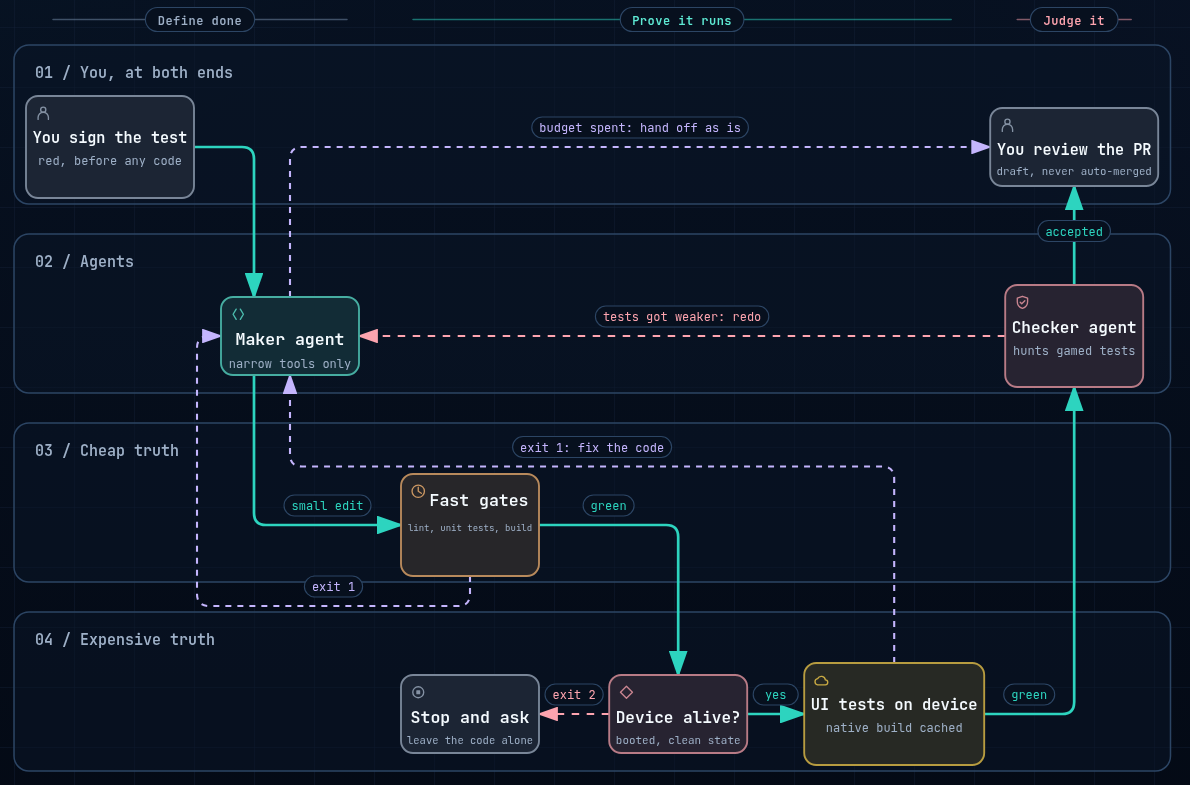
1. Narrow the tools. Give the agent build, test, and install commands that do one thing. Don’t make it work out the right shell incantation on every run.
2. Write the test first. A human approves an acceptance test before the agent writes any code. That test defines “done”, so the agent can’t renegotiate it halfway through.
3. Order the checks from cheap to expensive. Run lint, unit tests, and the build before touching a device. A broken import should cost seconds, not a five-minute UI run.
4. Make device runs cheap. Reset the emulator to a known state and only recompile native code when native inputs change. No Middleman does this by caching its dev client against a hash of those inputs, so a real device test can sit inside the loop.
5. Report failures honestly. Tell the agent whether its code failed or the environment did. A few exit codes get you most of the way there:
#!/usr/bin/env bash
# 0 = passed, 1 = code failure (fix it), 2 = infrastructure failure (don't touch the code)
./gradlew lint testDebugUnitTest assembleDebug || exit 1

timeout 60 adb wait-for-device || exit 2
[ "$(adb shell getprop sys.boot_completed | tr -d '\r')" = "1" ] || exit 2

./gradlew connectedDebugAndroidTest || exit 1
It’s only a sketch, since a missing SDK would still come back as a code failure. But an agent that sees 2 can stop and ask for help instead of rewriting a working screen.
6. Separate the maker from the checker. A green run isn’t the finish line. A second agent that never touched the code reviews the diff for weakened assertions, meaningless mocks, and masked timing problems. Tests can get stricter during the loop, never looser.
7. Stop at a pull request. Set hard limits on iterations and time, and always end with a draft PR, even when the budget runs out. A person still decides what merges.
Where to start
You don’t need all seven on day one. I’d start with the exit codes and one acceptance test on a real emulator, because those two change what the agent can actually see. If you want to go deeper, I’ve written about designing the control loop behind autonomous agents, how No Middleman verifies AI-written code, and how to test autonomous AI agents.
An agent that can’t see the running app is guessing. So before you switch models, check what your agent is able to observe. On mobile, that’s probably where the biggest gain is hiding.