03 Feb 2019
Introduction
Every Android app has a main thread which is in charge of handling UI (including measuring and drawing views), coordinating user interactions, and receiving lifecycle events. If there is too much work happening on this thread, the app appears to hang or slow down, leading to an undesirable user experience. Any long-running computations and operations such as decoding a bitmap, accessing the disk, or performing network requests should be done on a separate background thread.
Applications may also require some tasks to run even when the user is not actively using the app such as syncing periodically with a backend server or fetching new content within an app on a periodic basis. Applications may also require services to run immediately to completion even after the user has completed interacting with the app. Google created a guide called Guide to background processing which determines which solution best meets your needs for these use cases.
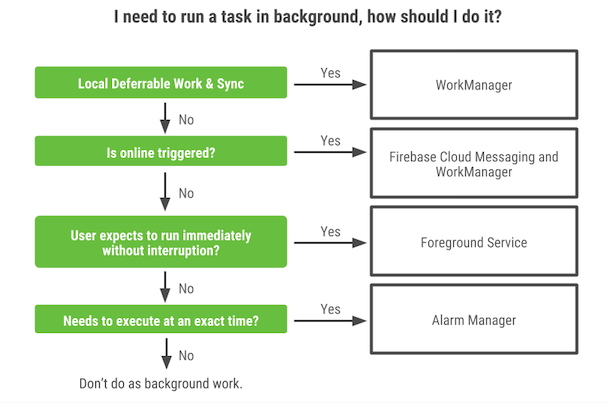
Diagram from Modern background execution in Android
WorkManager
Title
WorkManager is part of Android Jetpack and an Architecture Component for background work that needs a combination of opportunistic and guaranteed execution. Opportunistic execution means that WorkManager will do your background work as soon as it can. Guaranteed execution means that WorkManager will take care of the logic to start your work under a variety of situations, even if you navigate away from your app.
WorkManager is a simple, but incredibly flexible library that has many additional benefits. These include:
- Support for both asynchronous one-off and periodic tasks
- Support for constraints such as network conditions, storage space, and charging status
- Chaining of complex work requests, including running work in parallel
- Output from one work request used as input for the next
- Handles API level compatibility back to API level 14(see note)
- Works with or without Google Play services
- Follows system health best practices
- LiveData support to easily display work request state in UI
Get started
Add the WorkManager dependency in Java or Kotlin to your Android project by openning the build.gradle file for your project and add the google() repository as shown below:
allprojects {
    repositories {
        google()
        jcenter()
    }
}
Add the dependencies for the artifacts you need in the build.gradle file for your app or module. Currently you are able to add AndroidX dependencies or legacy Pre-AndroidX dependencies, so please choose the dependence what fit your project. Remember you can also add the $work_version into your gradle.build (project scope).
dependencies {
	def work_version = "2.0.1"

 	// (Java only)
	implementation "androidx.work:work-runtime:$work_version"

	// Kotlin + coroutines
	implementation "androidx.work:work-runtime-ktx:$work_version"

	// optional - RxJava2 support
	implementation "androidx.work:work-rxjava2:$work_version"
	// optional - Test helpers
	androidTestImplementation "androidx.work:work-testing:$work_version"
}
By default, WorkManager is initialized using a ContentProvider with a default Configuration. ContentProviders are created and run before the Application object, so this allows the WorkManager singleton to be setup before your code can run in most cases. This is suitable for most developers. However, you can provide a custom Configuration by using Configuration.Provider or initialize(android.content.Context, androidx.work.Configuration).
WorkManager BroadcastReceivers to monitor Constraints on devices before API 23. The BroadcastReceivers are disabled on API 23 and up. In particular, WorkManager listens to the following Intents:
android.intent.action.ACTION_POWER_CONNECTED
android.intent.action.ACTION_POWER_DISCONNECTED
android.intent.action.BATTERY_OKAY
android.intent.action.BATTERY_LOW
android.intent.action.DEVICE_STORAGE_LOW
android.intent.action.DEVICE_STORAGE_OK
android.net.conn.CONNECTIVITY_CHANGE
In addition, WorkManager listens to system time changes and reboots to properly reschedule work in certain situations. For this, it listens to the following Intents:
android.intent.action.BOOT_COMPLETED
android.intent.action.TIME_SET
android.intent.action.TIMEZONE_CHANGED
WorkManager uses the following permissions:
android.permission.WAKE_LOCK to make //it can keep the device awake to complete work before API 23
android.permission.ACCESS_NETWORK_STATE //to listen to network changes before API 23 and monitor network Constraints
android.permission.RECEIVE_BOOT_COMPLETED //to listen to reboots and reschedule work properly.
Note that WorkManager may enable or disable some of its BroadcastReceivers at runtime as needed. This has the side-effect of the system sending ACTION_PACKAGE_CHANGED broadcasts to your app. Please be aware of this use case and architect your app appropriately.
Further Details
Watch the full session: WorkManager — Android Jetpack (YouTube)
19 Jan 2019
Introduction
Lifecycle-aware components perform actions in response to a change in the lifecycle status of another component, such as activities and fragments. These components help you produce better-organized, and often lighter-weight code, that is easier to maintain.
A common pattern is to implement the actions of the dependent components in the lifecycle methods of activities and fragments. However, this pattern leads to a poor organization of the code and to the proliferation of errors. By using lifecycle-aware components, you can move the code of dependent components out of the lifecycle methods and into the components themselves.
Components
ViewModel - provides a way to create and retrieve objects that are bound to a specific lifecycle. A ViewModel typically stores the state of a view’s data and communicates with other components, such as data repositories or the domain layer which handles business logic. To read an introductory guide to this topic, see ViewModel.
LifecycleOwner/LifecycleRegistryOwner - both LifecycleOwner and LifecycleRegistryOwner are interfaces that are implemented in the AppCompatActivity and Support Fragment classes. You can subscribe other components to owner objects which implement these interfaces, to observe changes to the lifecycle of the owner. To read an introductory guide to this topic, see Handling Lifecycles.
LiveData - allows you to observe changes to data across multiple components of your app without creating explicit, rigid dependency paths between them. LiveData respects the complex lifecycles of your app components, including activities, fragments, services, or any LifecycleOwner defined in your app. LiveData manages observer subscriptions by pausing subscriptions to stopped LifecycleOwner objects, and cancelling subscriptions to LifecycleOwner objects that are finished. To read an introductory guide to this topic, see LiveData.
Lifecycle
Lifecycle is a class that holds the information about the lifecycle state of a component (like an activity or a fragment) and allows other objects to observe this state. Lifecycle uses two main enumerations to track the lifecycle status for its associated component:
Event – The lifecycle events that are dispatched from the framework and the Lifecycle class. These events map to the callback events in activities and fragments.
State – The current state of the component tracked by the Lifecycle object.
LifecycleOwner
LifecycleOwner is a single method interface that denotes that the class has a Lifecycle. It has one method, getLifecycle(), which must be implemented by the class. If you’re trying to manage the lifecycle of a whole application process instead, see ProcessLifecycleOwner.
This interface abstracts the ownership of a Lifecycle from individual classes, such as Fragment and AppCompatActivity, and allows writing components that work with them. Any custom application class can implement the LifecycleOwner interface.
Components that implement LifecycleObserver work seamlessly with components that implement LifecycleOwner because an owner can provide a lifecycle, which an observer can register to watch.
15 Dec 2018
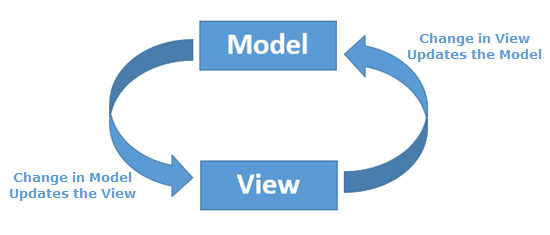
The Data Binding Library allows you to bind UI components in your layouts to data sources in your app using a declarative format rather than programmatically. In this codelab you’ll learn how to set it all up, use layout expressions, work with observable objects and create custom Binding Adapters to reduce boilerplate to a minimum.
Get Started
First thing we need to do is to enable the Data Binding library in yout project. So
modify your build.gradle (app module context) and add the following code:
android {
...
     dataBinding {
   	enabled true
	}
}
Sync your project and now you are able to convert or create a layout to a Data Binding layout. You must wrap your layout with a <layout> tag and optionally use the tags data, variables and expressions. You can also automatically convert a regular layout to Data Binding using the Android Studio by right-clicking the parent layout tag and selecting “Convert data binding layout”.
Example of usage 1
<layout xmlns:android="http://schemas.android.com/apk/res/android"
xmlns:tools="http://schemas.android.com/tools">
	<data>

  	<variable
      	name="viewmodel"
      	type="com.android.databinding.viewmodels.MyExampleViewModel"/>

		<variable name="funds" type="Integer"/>

	</data>

	<androidx.constraintlayout.widget.ConstraintLayout
       android:layout_width="match_parent"
       android:layout_height="match_parent">

.....

	</androidx.constraintlayout.widget.ConstraintLayout
</layout>
Layout variables are used to write layout expressions which are placed in the value of element attributes and they use the @{expression} format. See the following example:
Example of usage 2
<ImageView
	android:id="@+id/imageView"
	android:layout_width="wrap_content"
	android:layout_height="wrap_content"
	android:visibility="@{funds < 0 ? View.GONE : View.VISIBLE}"/>
Observing data
Instead of explicitly updating the UI when values changes, you can use [observables] to automatically updates the UI. In this way, another Architecture component of Android Jetpack library is recommended: LiveData.
Let’s discuss about only the observables and data binding works since this article is only explanning about Data Binding. When an observable value changes, the UI elements it’s bound to are updated automatically.
Use can freely interact with your data using DataBindingUtil. See the following example and notice DataBinding will auto-generate a class for you. In the Example, the class generated was MainActivityBinding because our original layout did not specify a name for the class so DataBinding simply used the name of the layout file and add word ‘Binding’ in the end:
main_activity.xml -> MainActivity + Binding -> MainActivityBinding
Example of usage 3
override fun onCreate(savedInstanceState: Bundle?) {
  super.onCreate(savedInstanceState)

  val binding : MainActivityBinding =
  DataBindingUtil.setContentView(this, R.layout.main_activity)

  	binding.viewmodel = viewModel
}
More details
I recommend you to watch this amazing tutorial presented by Dan Galpin: Level up with Data Binding and simplify your Android coding
20 Nov 2018
According to Blockchain experts, Non-Fungible Tokens can revolutionize the future of blockchain. Do you really understand this concept and how can it be used? Let’s start talking about the basics and discussing what makes NFTs special and with a promising future.
Fungible Tokens and Non Fungible Tokens
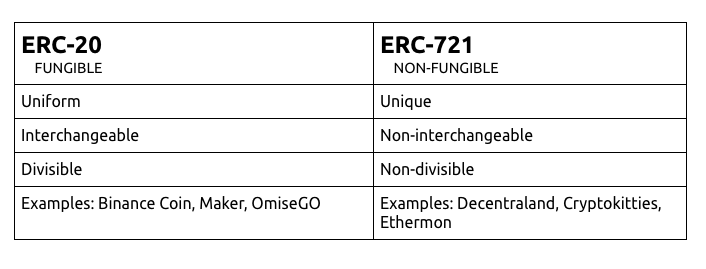
Fungibility is important in the world of blockchain and cryptocurrency. It is desired for any currency, traditional or digital, since most currencies aim to be an interchangeable asset. A token can be exchanged for any other token of the same value. For example, One US dollar currency can be changed for another US dollar currency without any difference to the user.
On the other hand, Non-Fungible Token can’t be exchanged for any other NFT, because it has a unique and non-interchangeable behavior. These characteristics make them different from each other and digitally scarce. It is possible to create an analogy of NFTs with opera show tickets. Although the tickets are for the same show and everyone will listen to the same songs, each ticket has an identifier, buyer’s name and seat number. They are not easily transferable because each ticket has its value in a unique way.
In the Ethereum network, there are popular patterns that have been specified by the community itself. Each standard is known as ERC which stands for Ethereum Request for Comments. It defines methods, technology, behaviors for a particular functionality in Ethereum and it is submitted either for peer review.
ERC-1155
ERC-1155 is a standard for contracts that manage any combination of fungible tokens and non-fungible tokens.
Let’s talk about how the management works in every mentioned pattern in this article. Each ERC-20 token is required to be deployed in separate contracts. In case of ERC-721, this requires a single contract for managing a group of non-fungible tokens. However ERC-1155 works differently, it can handle any fungible and non-Fungible tokens in a single contract. This allows control of multiple tokens with different types in the same deployed contract.
As a result, the pattern avoids tons of repetitive code circulating the several contracts in the Ethereum ecosystem and saving significant storage space and gas costs.
What is special about ERC1155?
The new standard is a powerful tool that joins fungible tokens that have been widely accepted (list of ERC-20 tokens) to the non-fungible tokens that are popularizing themselves (list of NFT tokens).
In addition, the interface ERC-1155 provides ways to make transactions more efficient. The interface defines the function “safeBatchTransferFrom” to group multiple tokens and enable atomic swaps. In other words, the interface allows multiple complex operations in a single transaction. This procedure is quite simple and does not involve complex implementation.
Backwards Compatibility is another feature of the standard. It is compatible with ERC-721 and ERC-20 which can be inherited without any issue.
ERC-1155 allows smart contracts to reference other contracts’ storage whenever it necessary. In this way, it avoids duplicating of code or misuse of storage by smart contracts. As a result, it improves the efficiency of the Ethereum ecosystem.
26 Jul 2018
Continuous Integration
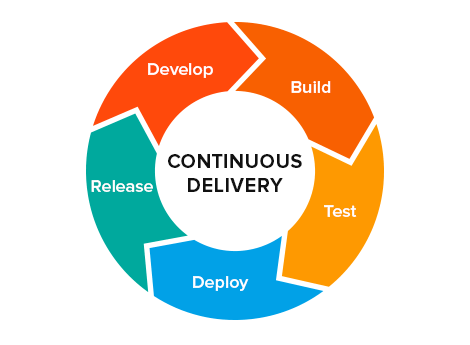
Continuous Integration aka CI is a development practice that requires developers to integrate code into a shared repository several times a day. Each check-in is then verified by an automated build, allowing teams to detect problems early. By integrating regularly, you can detect errors quickly, and locate them more easily and not integrating continuously you will have longer periods between integrations. This makes it exponentially more difficult to find and fix problems. Such integration problems can easily knock a project off-schedule, or cause it to fail altogether.
Travis CI
Using Travis CI, the users can easily sync Github projects and test the code test the code in minutes. Travis CI can be configured to run the tests on a range of different machines, with different software installed (such as older versions of a programming language implementation, to test for compatibility), and supports building software in numerous languages, including C, C++, C#, Clojure, D, Erlang, F#, Go, Apache Groovy, Haskell, Java, JavaScript, Julia, Perl, PHP, Python, R, Ruby, Rust, Scala and Visual Basic. Several high-profile open source projects are using it to run builds and tests on every commit, such as Plone, Ruby on Rails, and Ruby.[8][9
Truffle with Travis CI
Firstly, as prerequisite you should follow the Travis CI docs in order to integrate your Github project with Travis.
Then add the following chunk of code into your .travis.yml:
View the full .travis.yml snippet on GitHub Gist.
In this script, we are selecting nodeJs version 8.11.3 with latest version of Node package manager (npm). Ganache (old testRPC) and truffle are also installed. The trigger mechanisms starts with ganache initialization and the truffle command truffle test. In other words, the code will be compiled and the tests will ran too.
