27 Mar 2026
Claude Skills let you package your workflows, domain expertise, and preferences into reusable instruction folders that Claude loads automatically when relevant. The core philosophy: stop repeating yourself and start teaching Claude once. Instead of re-explaining your processes in every conversation, a skill captures that knowledge permanently — and applies it consistently across Claude.ai, Claude Code, and the API.
What Is a Claude Skill?
A skill is a folder containing a single required file — SKILL.md — plus optional supporting directories:
scripts/ — executable Python or Bash code that runs without consuming contextreferences/ — additional documentation loaded only as neededassets/ — templates, fonts, or icons used in outputs
Skills are portable: the same skill works identically across Claude.ai, Claude Code, and the API without modification. They’re also composable — Claude can load multiple skills at once, each contributing specialized expertise without interfering with the others.
The Three-Level Progressive Disclosure Architecture
Skills use a three-level loading system designed to minimize token usage while preserving deep expertise:
- Level 1 — YAML frontmatter: Always loaded into Claude’s system prompt. Contains just enough information for Claude to decide when the skill is relevant — without pulling the full content into context.
- Level 2 — SKILL.md body: Loaded when Claude determines the skill is applicable. Contains the full workflow instructions, examples, and error handling.
- Level 3 — Linked files: Additional documents inside the skill folder that Claude navigates and reads only as needed — API guides, reference docs, or detailed examples.
This progressive approach means a skill library of dozens of entries adds minimal overhead until the right skill is needed.
Writing the SKILL.md Frontmatter
The YAML frontmatter is the most critical part of any skill — it determines whether Claude loads it at the right moment.
---
name: sprint-planner
description: Manages sprint planning workflows including task creation, velocity analysis, and capacity planning. Use when user mentions "sprint", "plan tasks", "create tickets", or "sprint planning".
---
Key rules:
name must be kebab-case, no spaces, no capitals, matches the folder namedescription must include both what the skill does and when to trigger it — include specific phrases users would actually say- Keep description under 1024 characters; no XML angle brackets (security restriction)
- Optional fields:
allowed-tools (restrict tool access), license, and metadata for author, version, and MCP server info
A vague description like "Helps with projects" will never trigger reliably. A good description names file types, trigger phrases, and the concrete outcome the skill produces.
Three Categories of Skills
Anthropic’s guide identifies three common patterns in the wild:
Document & Asset Creation — Skills that produce consistent, high-quality output: frontend designs from specs, reports following team style guides, presentations from outlines. These rely only on Claude’s built-in capabilities with no external tools needed.
Workflow Automation — Multi-step processes that benefit from consistent methodology. A sprint planning skill, for example, can fetch project status via MCP, analyze team velocity, suggest prioritization, and create tasks — all as a single guided workflow with validation gates between steps.
MCP Enhancement — If you have a working MCP server, skills add the knowledge layer on top. Without a skill, users connect your MCP but don’t know what to do next and prompt inconsistently. With a skill, best practices are embedded: pre-built workflows activate automatically, reducing support burden and improving result consistency.
Testing, Iteration, and Distribution
Effective skills testing covers three areas:
- Triggering tests — Run 10–20 queries that should activate the skill and verify it loads without explicit invocation. Target: 90% auto-trigger rate.
- Functional tests — Verify correct outputs, successful API calls, and consistent structure across repeated runs.
- Performance comparison — Compare the same task with and without the skill enabled; measure tool calls, token consumption, and user corrections required.
The fastest path to a first skill is the skill-creator skill — available in Claude.ai via the plugin directory or for Claude Code. Describe your top 2–3 workflows, and skill-creator generates a properly formatted SKILL.md with frontmatter, trigger phrases, and suggested structure. Expect 15–30 minutes to build and test your first working skill.
For distribution: host the folder on GitHub, upload it to Claude.ai via Settings > Capabilities > Skills, or deploy organization-wide through enterprise managed settings (available since December 2025). For programmatic use, the /v1/skills API endpoint enables skills in production pipelines and agent systems via the container.skills parameter on the Messages API.
Skills are published as an open standard — portable across tools and platforms by design. Explore Anthropic’s public skills repository for production-ready examples across document creation, workflow automation, and partner integrations from Asana, Figma, Sentry, Zapier, and more. The complete guide and the introductory course are the best starting points to go deeper.
18 Jan 2026
Introduction
What if you could see exactly what stocks members of Congress are buying and selling—before the market fully reacts? What if artificial intelligence could analyze these public transactions in real-time and identify patterns that might inform your investment strategy?
Welcome to Capitol Trades Tracker, a groundbreaking mobile application that combines the power of agentic AI, multiple large language models (LLMs), and public government data to democratize access to political trading intelligence.
In an era where information asymmetry creates unfair advantages, Capitol Trades Tracker levels the playing field by making publicly disclosed congressional stock transactions not just visible, but understandable through cutting-edge AI analysis.
The Problem: Public Data, Hidden Insights
Federal law requires U.S. congressional members to disclose their stock transactions. This data is public, yet it remains largely inaccessible to everyday investors. The information exists in scattered government databases, difficult to parse, and nearly impossible to analyze at scale without sophisticated tools.
Meanwhile, institutional investors and hedge funds employ teams of analysts to monitor this exact data, looking for patterns that might indicate market-moving information. This creates a significant advantage for those with resources—until now.
The Solution: AI Agents Meet Public Transparency
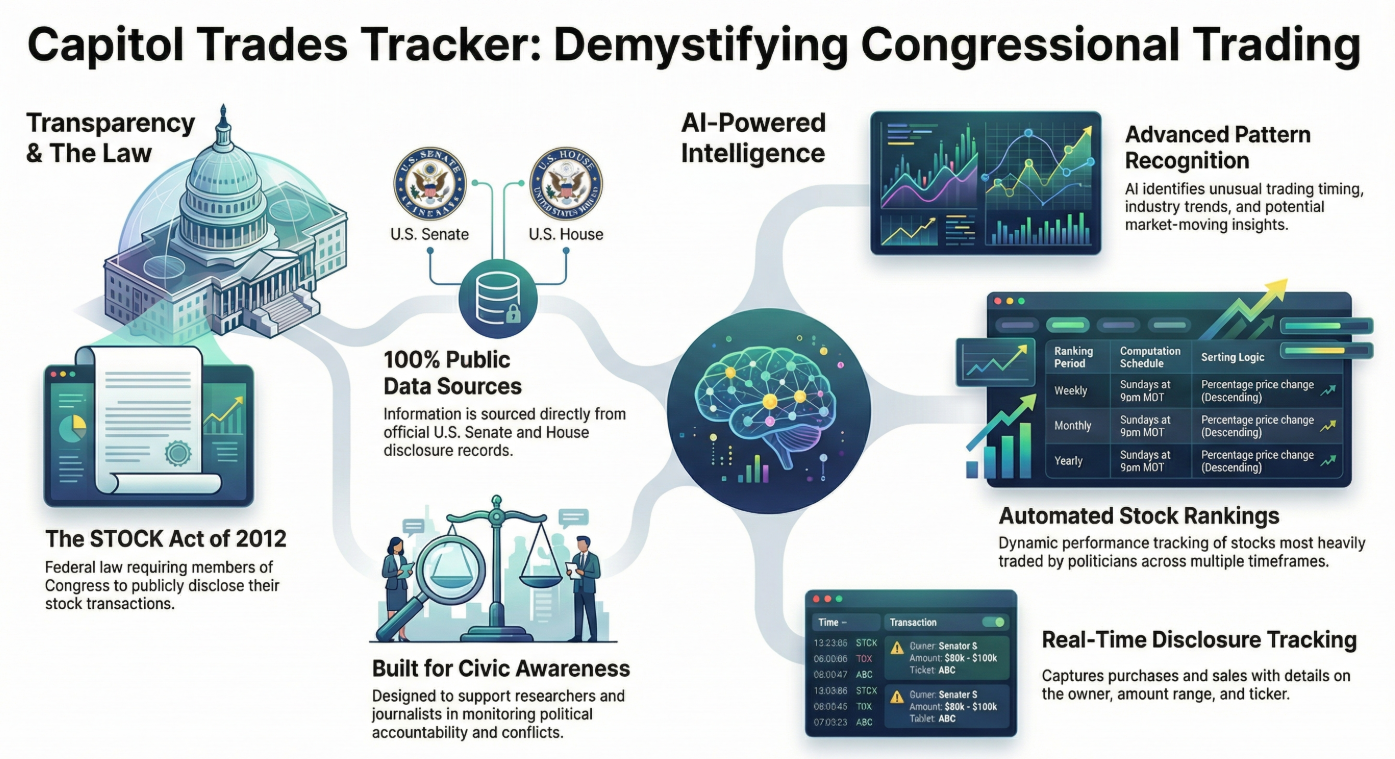
Capitol Trades Tracker bridges this gap by combining three powerful elements:
1. Comprehensive Data Aggregation
Every publicly disclosed stock transaction made by congressional members is automatically collected, normalized, and made accessible through an intuitive mobile interface. Users can see:
- Who traded (politician, office, district)
- What they traded (stock symbols, asset types)
- Transaction details (buy/sell, amount ranges, dates)
- Disclosure timing (transaction date vs. public filing date)
2. Koog-Powered AI Agents
At the heart of Capitol Trades Tracker is an intelligent AI agent built with Koog, a cutting-edge framework for developing autonomous AI agents. This isn’t just simple data retrieval—it’s sophisticated, multi-layered analysis that:
- Continuously monitors official government disclosure databases in real-time
- Processes and analyzes trading patterns using advanced algorithms
- Generates actionable insights in human-readable format
- Adapts and learns from market outcomes and political contexts
How the AI Technology Works
The Agentic Architecture
Unlike traditional applications that simply display data, Capitol Trades Tracker employs agentic AI—autonomous intelligent systems that can:
- Perceive: Monitor multiple data sources continuously, including official disclosure records, market data, and news feeds
- Reason: Apply complex analytical frameworks to identify unusual patterns, timing anomalies, and potential insider signals
- Act: Generate daily insights, flag significant trades, and deliver personalized notifications
- Learn: Improve analysis quality over time based on market outcomes
Daily Intelligence Generation
Every day, the AI agent generates fresh insights by:
- Scanning all new congressional trading disclosures
- Analyzing patterns in transaction timing, volume, and assets
- Correlating trades with pending legislation, industry trends, and market conditions
- Assessing whether trades might indicate advance knowledge
- Synthesizing findings into actionable investment intelligence
Each insight is delivered in clear markdown format with:
- Executive summary of key findings
- Detailed analysis of significant trades
- Potential investment implications
- Risk considerations
- Supporting context and reasoning
Key Features: Intelligence at Your Fingertips
📊 Trading Feed
Comprehensive, continuously updated feed of congressional stock transactions with visual indicators (green for purchases, red for sales), detailed trade information, and powerful filtering capabilities.
🤖 AI-Powered Insights Library
Complete archive of daily AI-generated analysis, showing:
- Which LLM model performed each analysis
- Date and context of the insight
- Detailed reasoning and recommendations
- Historical performance tracking
🏠 Intelligent Dashboard
Personalized home screen featuring:
- Latest AI insight with key takeaways
- Most recent congressional transaction
- Relevant news and market updates
- Quick access to all features
👤 Secure Profile Management
Google account integration for secure authentication, preference management, and personalized notifications.
📱 Mobile-First Design
Beautiful, responsive Android app built with modern Material Design, ensuring intuitive navigation and smooth performance.
Who Benefits: Democratizing Investment Intelligence
📈 Individual Investors
Gain the same insights that institutional investors pay millions for. Make informed decisions based on what politicians are actually doing with their money.
🎓 Researchers & Academics
Access comprehensive historical data and AI analysis to study political trading patterns, market behavior, and governmental transparency.
💼 Financial Advisors
Stay ahead of market-moving political activities to better serve clients with timely, data-driven advice.
🔍 Transparency Advocates
Monitor political accountability and potential conflicts of interest through accessible, AI-enhanced public data.
Real-World Impact: The Power of Transparency + AI
Capitol Trades Tracker represents a fundamental shift in how public data can serve public good:
Leveling the Playing Field: What was once exclusive intelligence for well-resourced institutions is now available to anyone with a smartphone.
Promoting Accountability: By making political trading patterns visible and understandable, we encourage greater scrutiny and responsibility.
Enabling Better Decisions: AI-powered analysis transforms raw data into actionable intelligence, helping users understand not just what happened, but why it matters.
Advancing Transparency: Making public data truly accessible furthers democratic ideals and informed citizenship.
The Future: Expanding AI-Powered Transparency
This is just the beginning. Future enhancements include:
- Predictive analytics using advanced machine learning
- Portfolio tracking to compare your holdings against congressional trades
- Custom alerts for specific politicians or sectors
- Expanded coverage to state-level officials
- Community insights where users can share analysis
- API access for developers and researchers
Conclusion: AI for Good, Intelligence for All
Capitol Trades Tracker demonstrates how cutting-edge AI technology can serve the public interest. By combining Koog’s agentic AI framework with multiple large language models and publicly available data, we’ve created a tool that:
- Makes government more transparent
- Empowers individual investors
- Advances democratic accountability
- Leverages AI for social good
This isn’t about creating unfair advantages—it’s about eliminating them. It’s about using the most advanced AI technology to ensure that public information serves the public, not just those with resources to analyze it.
The data is public. The AI is powerful. The insights are yours.
28 Nov 2025
Introduction
Modern mobile UIs increasingly rely on rich visual effects: gradients, blurs, distortions, ripple animations, and real-time visual feedback. On Android, AGSL (Android Graphics Shading Language) enables developers to create these effects efficiently by running custom GPU shaders directly within the Android rendering pipeline.
This article provides a quick, practical introduction to AGSL, explains where and how it is used, and compares it with similar technologies on iOS and other platforms, helping Android developers understand when AGSL is the right tool.
What is AGSL?
AGSL (Android Graphics Shading Language) is Android’s domain-specific shading language used to write fragment shaders that run on the GPU.
Key points:
- Based on SkSL (Skia Shading Language)
- Designed to be safe, portable, and optimized for Android
- Integrated with Skia, Android’s 2D graphics engine
- Primarily used for pixel-level visual effects
AGSL shaders operate on pixels, not geometry. This makes them ideal for:
- Color transformations
- Distortions
- Gradients
- Blur and glow effects
- Procedural textures
Why AGSL Exists
Historically, Android developers relied on:
- XML drawables
- Canvas drawing
- RenderScript (now deprecated)
- OpenGL ES (powerful but complex)
AGSL fills an important gap:
- ✅ Easier than OpenGL / Vulkan
- ✅ More powerful than XML or Canvas
- ✅ GPU-accelerated
- ✅ First-class support in modern Android APIs
It is especially relevant in the Jetpack Compose era, where expressive UI and animations are core expectations.
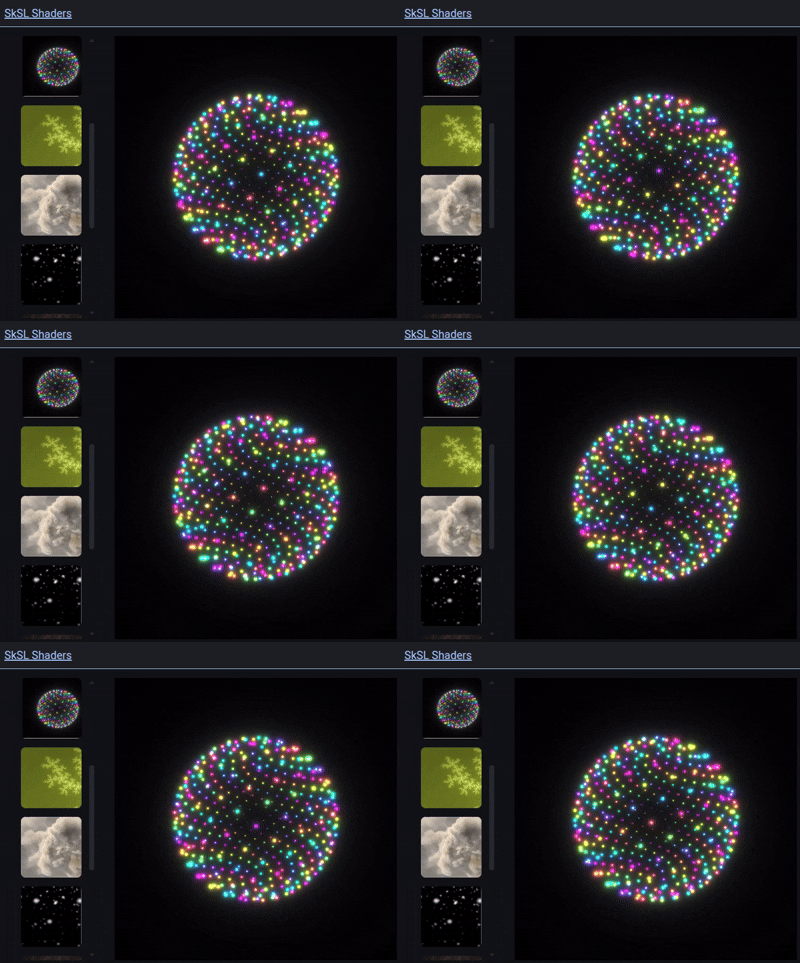
Shaders example from https://shaders.skia.org/
A Simple AGSL Example
Here’s a minimal AGSL fragment shader that creates a time-based color animation:
uniform float2 resolution;
uniform float time;

half4 main(float2 fragCoord) {
    float2 uv = fragCoord / resolution;
    float color = 0.5 + 0.5 * sin(time + uv.x * 10.0);
    return half4(color, uv.y, 1.0, 1.0);
}
This shader
- Uses uniforms (resolution, time)
- Computes colors per pixel
- Runs entirely on the GPU
- Using AGSL in Android
AGSL with Jetpack Compose
AGSL is most commonly used today via RuntimeShader in Jetpack Compose:
val shader = RuntimeShader(agslCode)

ShaderBrush(shader)
You can then:
- Pass uniforms (time, size, colors)
- Animate shaders using Compose animations
- Apply shaders to backgrounds, images, or custom layouts
This integration makes AGSL extremely powerful for modern UI effects.
AGSL shaders:
- Run on the GPU
- Are compiled and optimized by Skia
- Avoid CPU-bound rendering
However, AGSL offers excellent performance-to-complexity balance:
- Complex shaders can still impact frame time
- Overuse can increase GPU load
- Always test on low-end devices
On iOS, the closest equivalent is Metal Shading Language (MSL).
AGSL is UI-centric and constrained, while Metal is a general-purpose GPU API.
Flutter also supports custom shaders via SkSL-compatible fragment programs.
| Aspect |
AGSL (Android) |
Metal (iOS) |
| Level |
High-level, 2D-focused |
Low-level, full GPU |
| Complexity |
Low–Medium |
High |
| API Integration |
Skia / Compose |
Metal framework |
| Use Case |
UI effects, 2D shaders |
UI, 3D, compute |
| Learning Curve |
Gentle |
Steep |
When Should You Use AGSL?
Use AGSL when you need:
✨ Custom visual effects
🎨 Dynamic gradients or distortions
🌊 Shader-based animations
⚡ GPU-accelerated UI rendering
Avoid AGSL when:
- A standard Compose modifier already exists
- The effect is static and simple
- Maintainability is more important than visual fidelity
Limitations of AGSL
- Fragment shaders only (no vertex shaders)
- Limited API surface (by design)
- Debugging can be harder than CPU code
- Not suitable for complex 3D rendering
AGSL is not a replacement for OpenGL, Vulkan, or Metal.
02 Oct 2025
AI agents are a paradigm shift in how we design and interact with artificial intelligence. AI agents are programmed not only to respond to a single query but to reason, plan, act, and iterate on their own in order to reach a goal.
This piece will examine what AI agents are, how they function, what distinguishes them from traditional AI processes, the skills needed to excel at agentic AI, and the most popular tools you can currently utilize to build your own AI agents.
What is an AI Agent?
An AI agent is a smart system capable of:
-
Obtain a high-level goal;
-
Break it down into steps;
-
Decide on the tools or actions to employ;
-
Perform those actions;
-
Observe the outcomes and make adjustments in strategy;
Unlike conventional AI models (e.g., chatbots), AI agents are goal-oriented. They do not merely respond to inquiries — they make decisions on what actions to take next. This renders the AI agent a very effective tool for automation, research, testing, software development, data analysis, and decision-making systems.
It is useful to distinguish between:
LLMs → Responses to individual prompts;
Workflows → Predefined, human-designed sequences of steps;
Agents → Systems that choose and control the workflow themselves;
Core Components of an AI Agent
Most AI agents are based upon a few key elements:
Reasoning Engine
The reasoning layer is accountable for goal understanding, task breakdown, and determining the best possible next action. This is usually done with the help of an LLM (Large Language Model).
Planning
Planning enables the agent to plan the sequence of actions rather than acting step by step. Some agents plan ahead, while others plan dynamically after the execution of each action.
Memory
Memory enables agents to store: Past behavior, Intermediate results and Long-term knowledge. The knowledge that can be maintained within long-term memory needs to be adequate for the character to progress appropriately in the story. The type of knowledge that should be stored in this region of memory is the ability to ride a bicycle. This skill requires practice, and the character should demonstrate that they have learned it.
Tools & Actions
The agents interact with the world through tools such as: APIs, Databases, File systems or Browsers.
Feedback & Iteration
The agents assess the outcome of their actions and make decisions on whether to continue, retry, or modify their strategy. This process is what gives the agents autonomy. In agentic systems, decision-making is entrusted to the AI itself and not hard-coded by programmers.
Skills Needed to Master Agentic AI
Agentic AI requires more system design skill than prompt writing skill. The important skills are:
Goal Decomposition — The capacity to decompose complex objectives into smaller, solvable tasks that the agent can reason about.
Tool Design — Well-designed tools are essential. Agents work better when tools are: Clearly defined, Narrow in scope and Deterministic when possible.
Evaluation & Guardrails — Agents must have constraints to prevent infinite loops, hallucinations, or unsafe behaviors. These include: Success criteria, Step limits and Validation rules.
Memory Management — How much the agent should remember, and for how long, is a major architectural choice.
Human-in-the-Loop Design — In most practical scenarios, the agents would be working semi-autonomously with human approval checkpoints rather than full autonomy.
Iterative Improvement — Performance is improved through experimentations, logging, and refinements rather than one-shot executions.
Systems Thinking — In Agentic AI, one has to think beyond the response, including orchestration, observability, failure modes, and scalability.
Agent Frameworks for Developers
The environment for developing AI agents is an ever-changing one. Some of the most popular tools being used currently are listed below.
LangChain – A widely used framework that chains LLMs together using tools, memory, and control logic.
CrewAI – Emphasizes the collaboration of multiple agents with defined roles.
AutoGPT-like frameworks – Early autonomous agents that cycled between planning and execution loops.
OpenAI Agent Builder / AgentKit – Tools for building structured, tool-driven agents with safety guardrails.
Koog.ai – A Kotlin‑centric framework for developing AI agents, emphasizing strong typing, modular prompt executors, and a clean separation of reasoning, tools, and orchestration. Especially suited for backend and Android‑adjacent spaces.
19 Aug 2025
Testing Android apps is often repetitive, time-consuming, and hard to scale. Recently, I started experimenting with agentic AI to automate mobile testing—combining Kotlin, Koog, and LLMs to build a smart tester that can execute real end-to-end scenarios.
The result is my new project: Koog - Agentic Mobile Tester.
Why I Built This
As an Android developer, I’ve used Espresso, UIAutomator, and other frameworks. They’re powerful, but still rigid: you need to write detailed test scripts and keep them updated. I wanted to explore whether an AI agent could take high-level goals like “Log in and navigate to the profile screen” and figure out the steps automatically.
How It Works
The project is powered by Koog.ai and Kotlin, using an LLM as the reasoning engine (options include Gemini, Llama, GPT, or Gwen). Here’s the flow:
The backend is built with Ktor in Kotlin and powered by a custom Koog agent (MobileTestAgent) plus a toolkit of device actions (MobileTestTools).
Ktor API
The Ktor server exposes endpoints that receive test scenarios and configuration (LLM model, temperature, iterations). Each request is routed to the MobileTestAgent, which runs the scenario with the chosen parameters.
MobileTestAgent (Koog Agent)
MobileTestAgent encapsulates the Koog agent setup. It translates high-level test goals into an iterative reasoning process, where the LLM plans actions like “tap login button” or “enter text”. The agent respects limits such as max iterations and temperature to balance creativity and determinism.
MobileTestTools (Device Interaction)
MobileTestTools provides the executable layer via ADB commands. It includes functions for:
- Interactions:
tap(), typeText(), scroll(), swipe()
- Checks:
assertTextVisible(), getUiHierarchy()
- Utilities:
launchApp(), installApk(), takeScreenshot()
These functions are registered as tools within Koog, so when the agent plans an action, Koog calls the corresponding method directly.
Execution Flow
- Ktor receives a scenario and sends it to the agent.
- Koog plans the next step using the LLM.
- The selected
MobileTestTools method executes the action on the device.
- Feedback (UI state, success/failure) is fed back into the agent.
- This loop continues until the scenario ends or max iterations are hit.
At the end, a structured report is generated with actions, results, and optional artifacts (like screenshots), and returned to the frontend dashboard.
- Users create test scenarios (goals & steps) via a ReactJS dashboard.
- The site was designed with Stitch and stores data in Cloud Firestore.
- Users can also tweak AI agent parameters like:
- Model (Gemini, GPT, etc.)
- Temperature
- Max iterations
- To showcase the system, I created a simple demo Android app.
- The agent can interact with it and validate flows end-to-end.
Example Flow
No need to maintain test scripts—just provide the goal.
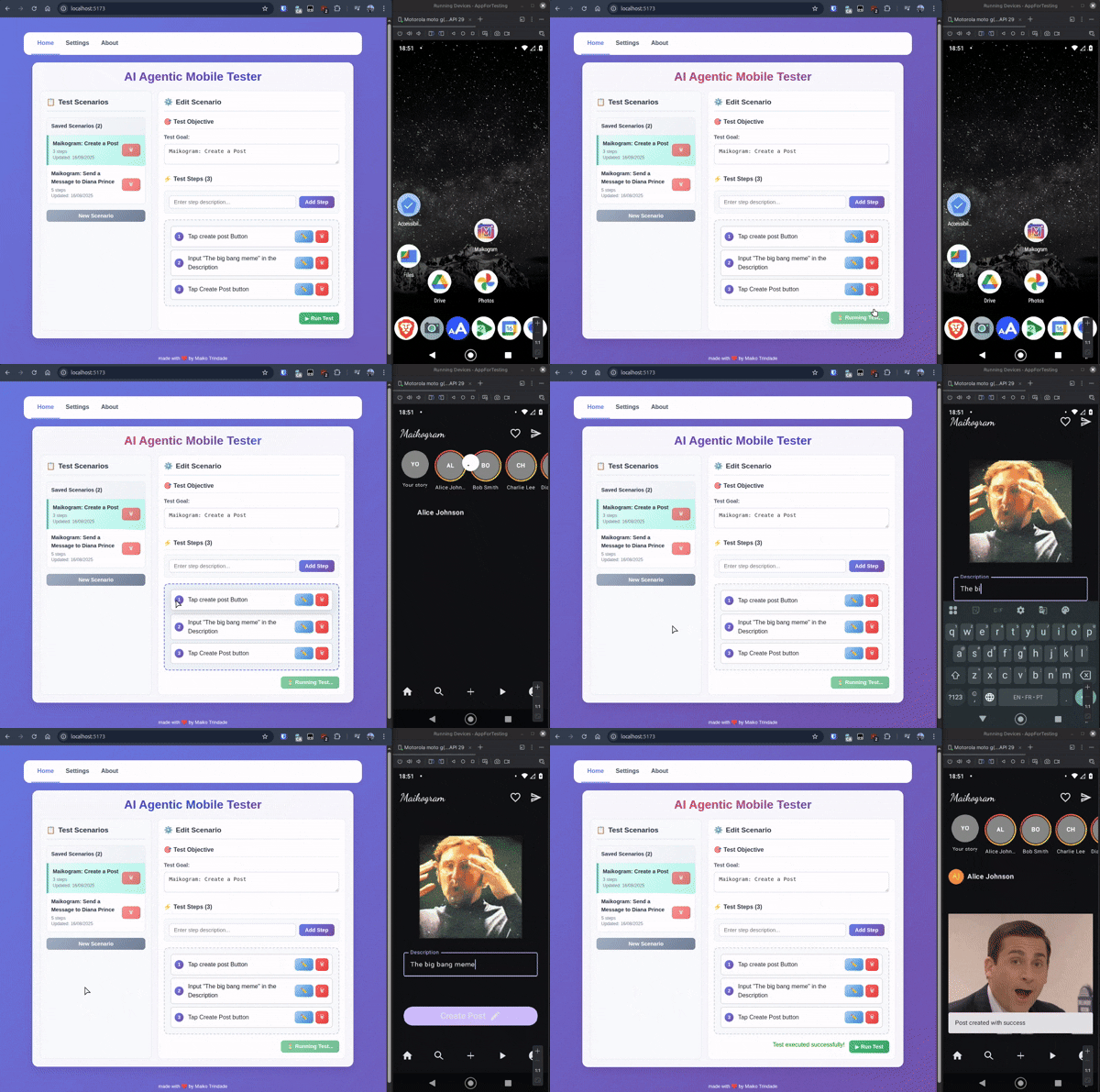
Why Kotlin + Koog?
Kotlin gave me the flexibility to build a clean API with Ktor and manage complex agent logic easily. Koog.ai, with its Model Context Protocol (MCP) integration and agentic design, allowed me to connect the LLM with Android tooling like ADB seamlessly.
This mix of Kotlin, LLMs, and Android dev tools opens a new way of thinking about mobile testing: instead of scripting, you describe intentions.
What’s Next
- Improving reporting (screenshots, videos, structured logs).
- Expanding to iOS and Web end-to-end testing.
- Exploring CI/CD integration for real-world teams.
Links
This was a fun experiment mixing Kotlin + AI agents + Android testing. If you’re curious about agentic AI, Koog, or just want to rethink mobile testing, I’d love feedback, feel free to DM on LinkedIn! 🚀
