22 Apr 2022
As Ethereum continues to gain popularity as a platform for decentralized applications (dApps), it is important for developers to adhere to best practices and utilize design patterns in order to create robust and secure dApps.
One key best practice for Ethereum development is to use a modular architecture. This involves breaking down the dApp into smaller, more manageable components that can be tested and developed independently. This not only makes the development process more efficient, but it also makes it easier to identify and fix issues.
Another important best practice is to use version control systems such as Git to track changes to the dApp’s codebase. This allows developers to easily revert to previous versions if necessary and collaborate with other team members.
Design patterns are also essential for Ethereum development. One commonly used pattern is the factory pattern, which allows developers to create new instances of a contract without having to hardcode its address. This is useful for deploying contracts to different networks or for testing purposes.
Another useful design pattern is the upgradable contract pattern, which allows developers to make changes to a contract without having to deploy a new version. This is particularly useful for bug fixes or feature updates, as it avoids the need to migrate users to a new contract.
Overall, adhering to best practices and utilizing design patterns can help ensure the success of an Ethereum dApp. By following these guidelines, developers can create more efficient and secure dApps that are better able to meet the needs of users.
12 Mar 2022
Consensus mechanisms are an essential component of any decentralized system or blockchain. They are the process by which a group of participants in a network reach agreement on a single version of the truth. In a decentralized system, there is no central authority to enforce rules or make decisions, so the consensus mechanism is what ensures that the network operates smoothly and fairly.
There are several different types of consensus mechanisms, each with its own strengths and weaknesses. Here are some of the most common ones:
Proof of Work (PoW)
Proof of Work is the consensus mechanism that is used by the Bitcoin blockchain. It works by requiring participants (miners) to solve complex mathematical puzzles in order to validate transactions and add them to the blockchain. The first miner to solve the puzzle gets to add the block to the chain and is rewarded with a small amount of cryptocurrency.
Proof of Stake (PoS)
Proof of Stake is a consensus mechanism that uses a different approach to validate transactions. Instead of requiring miners to solve complex puzzles, it relies on a group of validators who are chosen based on the amount of cryptocurrency they hold (their stake). The more cryptocurrency a validator has, the more likely they are to be chosen to validate a transaction. This system is less resource-intensive than Proof of Work, but it has its own set of potential problems, such as the potential for validators with a large stake to dominate the process.
Delegated Proof of Stake (DPoS)
Delegated Proof of Stake is a variation of Proof of Stake that involves a group of elected representatives who are responsible for validating transactions. The representatives are chosen by the network participants through a voting process. This system is meant to be more democratic and efficient than Proof of Work, but it has faced criticism for being susceptible to centralization and bribery.
Federated Byzantine Agreement (FBA)
Federated Byzantine Agreement is a consensus mechanism that is used by the Stellar blockchain. It works by having a group of trusted nodes (called validators) that are responsible for verifying transactions. The validators reach consensus by communicating with each other and agreeing on the validity of the transaction. This system is faster and more efficient than Proof of Work, but it relies on the trustworthiness of the validators.
Proof of Authority (PoA)
Proof of Authority is a consensus mechanism that is used by private blockchains or those that require a high level of security. It works by having a group of trusted individuals or organizations (called validators) that are responsible for verifying transactions. This system is more efficient and secure than Proof of Work, but it relies on the trustworthiness and integrity of the validators.
Consensus mechanisms are an important part of any decentralized system, as they ensure that the network is secure, efficient, and fair. It’s important to carefully consider the pros and cons of different consensus mechanisms before choosing one for your project.
28 Jun 2021
Chainlink
Chainlink is a decentralized network of nodes that provide data and
information from off-blockchain sources to on-blockchain smart
contracts via oracles
Chainlink greatly expands the capabilities of smart contracts by enabling access to real-world data and off-chain computation while maintaining the security and reliability guarantees inherent to blockchain technology.
This tutorial will be based on this repo and we will use Truffle – a development environment, testing framework and asset pipeline for Ethereum
Prerequisite
1. Install NodeJS
2. Install Truffle: npm install -g truffle
3. Install Metamask
4. Install Ganache
5. Install VSCode
6. Install Solidity Plugin
Hands on: Truffle + Chainlink
npm install --global yarn
mkdir Chainlink
cd Chainlink
truffle unbox smartcontractkit/box
yarn
Running tests
Run Ganache or enable/integrate
Kovan testnet
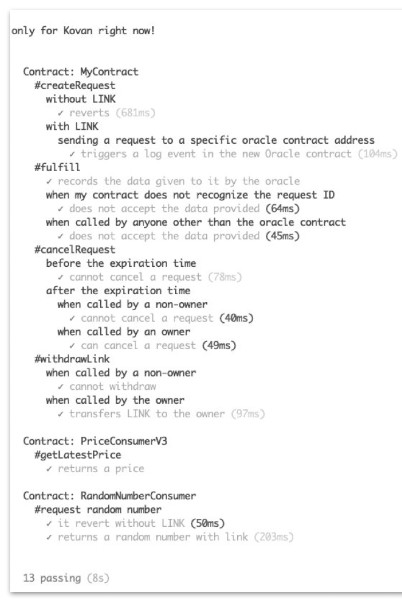
npm test
All tests of /test will be executed.
There are tests about creating requests with and without Link tokens, sending these requests to oracle contract addresses, and testing contract ownership.
Note
You must acquire some LINK for interact with you smart contract.
Get some LINK via Chainlink Kovan Faucet website 🤑 🤑 🤑
Ganache deployment
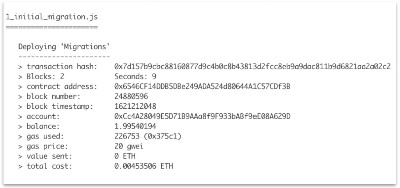
truffle migrate --network ganache --reset
Kovan deployment
- Setup Metamask and connect to Kovan network
- Faucet: faucet.kovan.network
- Create account and a project using Infura.io – step-by-step tutorial
- Infura setup and “env.sample” file configuration
truffle migrate --network kovan --reset
Helper scripts
Scripts to interact with deployed smart contract without any frontend implementation:
- fund-contract.js
npx truffle exec scripts/fund-contract.js --network kovan
- request-data.js
npx truffle exec scripts/request-data.js --network kovan
- read-contract.js
npx truffle exec scripts/read-contract.js --network kovan
● fund-contract.js
➢ Send 1 LINK to requesting contract
● request-data.js
➢ Chainlink request to be created from the requesting contract
● read-contract.js
➢ Read the data variable of the requesting contract (current price of pair ETH/USD)
Chainlink docs
Chainlink official website
Truffle Starter kit impl
Code a REAL WORLD dApp with Chainlink - Ethereum, Solidity, Web3.js
What Is Chainlink in 5 Minutes
12 Jun 2021
Why
Blockchain’s inability to fetch reliable information from the real world
● Huge vulnerability in decentralized applications when Blockchain wants to take advantage of off-chain data
● Origins of data are also the points where data can be manipulated, compromised, or simply falsified
● Chainlink started on Ethereum but it’s also available on Polkadot, Hyperledger, etc…
Chainlink
Decentralized network of nodes that provide data and information from off-blockchain sources to on-blockchain smart contracts via oracles.
LINK is built on Ethereum in accordance with the ERC-20 standard for tokens
❏ Sep 2017 – Chainlink raises $32 million in an ICO creating 1 billion LINK tokens
❏ Nov 2018 – Chainlink acquires TownCrier
❏ May 2019 – Chainlink is launched on Ethereum mainnet
❏ May 2021 – Chainlink 2.0 whitepaper
The Chainlink’s oracle
Oracle – Middleware that acts as an intermediary, translating data from the real world to smart contracts on the blockchain and back again
Chainlink – Decentralized network of nodes that provide data and information from off-blockchain sources to on-blockchain smart contracts via oracles
🥇 Market standard for decentralized oracles
✅ Enhance and extend the capabilities of smart contracts on a target
blockchain through functions that are not available natively
✅ To minimize the potential failure of oracles: Distribution of data sources,
Distribution of oracles and Use of trusted hardware
✅ The Chainlink Reputation Contract
Chainlink 2.0
Chainlink 2.0: Next Steps in the Evolution of Decentralized Oracle Networks
Oracle networks go far beyond delivering highly validated data, they provide the various decentralized
services that are combined with smart contracts to create real world outcomes. These hybrid smart
contracts are already redefining our industry as DeFi.
🔥 Hybrid Smart Contracts that are seamlessly connected to all necessary off-chain resources, while
retaining increased levels of privacy and being secured
🔥 New “architecture” enables more advanced off-chain computation
🔥 Increase number of services since ecosystem is more flexible and enhance its capabilities. Chainlink
is the future of DeFi
Glossary
ERC-20: technical standard used to issue and implement tokens on the Ethereum blockchain. It makes
easier for developers to predict with more accuracy the interaction between different tokens and
applications
Faucet: website that distributes small amounts of crypto
ICO: An Initial coin offering occurs when company looking to raise money to create a new coin, app, or
service launches an ICO as a way to raise funds. Similar to an IPO
Middleware: software that acts as a bridge between an operating system or database and applications,
especially on a network
Off-chain: Transactions which agree to happen outside the blockchain
On-chain: normally refer to as blockchain transactions which happens inside the blockchain
Top Oracles Tokens by Market Capitalization
77 Smart Contract Use Cases Enabled By Chainlink
Expanding Beyond Data Delivery With Chainlink 2.0
29 Sep 2020
Intro
Solidity supports multiple inheritance including polymorphism. Inheritance is the process of defining multiple contracts that are related to each other through parent-child relationships. The contract that is inherited is called the parent contract and the contract that inherits is called the child contract.
When a contract inherits from other contracts, only a single contract is created on the blockchain, and the code from all the base contracts is compiled into the created contract. This means that all internal calls to functions of base contracts also just use internal function calls.
The benefits of using inheritance are: Ability to change one contract and have those modifications reflected in others, Reducement of dependency nad Ability to reuse existing code more.
Example of Inheritance
pragma solidity ^0.8.0;

contract Grandparent {
    function myFunction() public pure virtual returns (string memory) {
        return "Contract Grandparent";
    }
}

// Contracts inherit other contracts by using the keyword 'is'.
contract Parent is Grandparent {
    // Override Grandparent.myFunction()
    function myFunction() public pure virtual override returns (string memory) {
        return "Contract Parent";
    }
}

contract Uncle is Grandparent {
    // Override Grandparent.myFunction()
    function myFunction() public pure virtual override returns (string memory) {
        return "Contract Uncle";
    }
}
Note: Solidity copies the base contracts into the derived contract and a single contract is created with inheritance. A single address is generated that is shared between contracts in a parent-child relationship.
💡 Gotchas
- In the case of multiple inheritances, function calls using super gives preference to most derived contracts;
- There are different types of inheritances: Single, Multi-level, Multiple and Hierarchical;
- A derived contract can access all non-private members including state variables and internal methods. But using this is not allowed;
- We can call a super contract’s function using a
super keyword or using a super contract name;
Inheritance in Solidity – Solidity docs
